Understanding What Works Offline in New Outlook for Windows 2026
Updated June 2026: New Outlook Offline support continues to improve, but it still does not match every offline feature users may remember from Classic Outlook.
For years, Outlook users relied on Classic Outlook to keep working without a reliable internet connection. Earlier versions of New Outlook were more limited, but Microsoft has been expanding offline capabilities over time.
This post focuses on what New Outlook for Windows supports offline today, what still requires a live connection, and what users should know before relying on offline mode. If you manage users, train teams, or evaluate readiness for moving to New Outlook, these distinctions matter.
Start here: This is the first video in my New Outlook Offline series. It walks through how to set up offline mode and what was supported when offline functionality first rolled out in August 2024.
What Works Offline Today in New Outlook
These features are available when your device is not connected to the internet. They’re reliable, fast, and designed to match key functionality from Classic Outlook.
As of June 9, 2026
Read, Manage,
and View
- Create and save new email drafts
- Include file attachments
- Open and read email
- Rename folders
- Send new drafts to the Outbox
- View calendar and existing events
- View contacts
Perform Inbox
Actions
- Archive
- Categorize
- Delete
- Filter
- Flag / Unflag
- Ignore
- Mark as Read / Unread
- Move to Focused / Other
- Move to folder
- Pin messages
- Reply to or forward emails
- Report Junk / Not Junk
- Report phishing
- Search
- Snooze
Create, Edit, Delete, and Update
- Create/edit/delete single instance calendar events*
- Update About Outlook settings
- Update Automatic Replies
- Update Categories
- Update Email Accounts
These actions work offline because Outlook stores key mailbox, calendar, and people data locally. Email drafts can be queued in the Outbox until the device reconnects. Calendar events behave differently. They appear on your calendar grid or in My Day and sync when Outlook reconnects.
January 2025 Offline Update: More offline features were released, but there were still important watchouts for users and IT teams.
June 2026 Offline Update: New offline capabilities are available, including additional calendar support, but some features still require an internet connection.
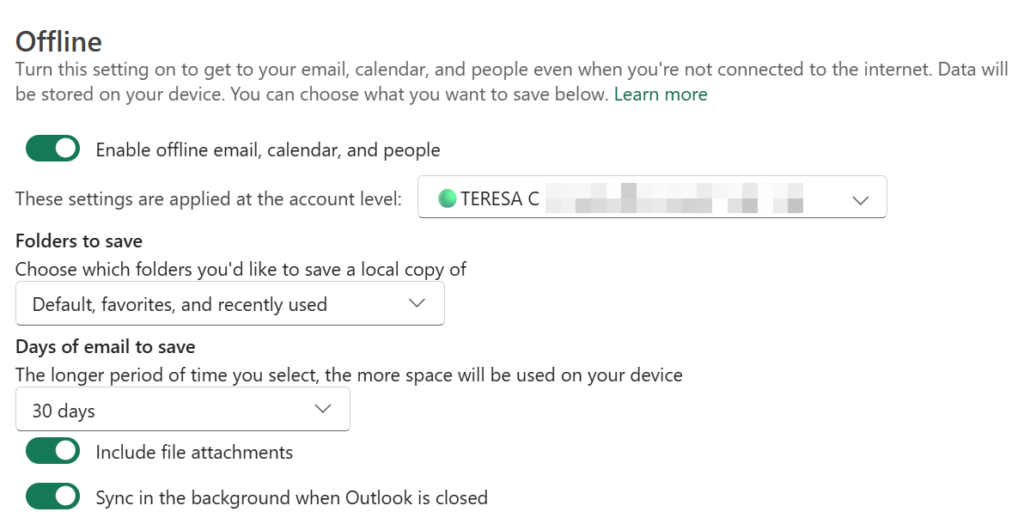
Enable Offline Settings in New Outlook
To enable settings for Offline mode:
- View Settings | General | Offline
- Enable the following:
- Enable offline email, calendar, people
- Folder to Save: Default, Favorites, and recently used
- Days of email to Save: 30 days (90 and 180 days may be too many, but you choose what’s best for you.)
- Include file attachments
- Sync in the background when Outlook is closed,
What Still Requires an Internet Connection
Some New Outlook features still require an internet connection because they depend on mailbox services, cloud processing, shared resources, or organization directory data.
As of June 9, 2026:
Currently Unsupported While Offline
Inbox
- Sort emails using full index
- Update signatures and notification settings
- Use Mail Templates
- Use Quick Parts
- View email groups
- View search folders
- View shared or delegated mailboxes
Calendar / Contacts
- Add a Teams link to a calendar event
- Create, edit, delete, or cancel recurring calendar series
- Create, update, or delete contacts
- RSVP to meeting invitations
- Update calendar settings
- View calendar groups
- View full global address list
- View full profile card details, such as org chart or LinkedIn information
Apps
- Copilot
- OneDrive
- To Do
FAQ: Common Questions About New Outlook Offline Mode
Before wrapping up, here are a few common questions about New Outlook offline mode. These answers are based on my recent testing and additional clarification from Microsoft. Some offline features may sound simple at first, but the behavior can be different depending on whether you are working with email, calendar events, Teams meeting links, contacts, or cloud-connected features like Copilot.
Yes. You can create, edit, delete, and cancel single-instance calendar events while offline. This is useful when you need to quickly block focus time, add an appointment, or make a simple calendar change without an internet connection.
However, this offline support does not fully apply to recurring meeting series. Creating, editing, deleting, or canceling recurring event series while offline is still a larger area of work.
No. This is an important difference between email and calendar behavior.
When you draft or send an email while offline, the message can appear in the Outbox until Outlook reconnects. Calendar events behave differently. If you create a calendar event while offline, it appears on your calendar grid or in My Day. When Outlook reconnects, the meeting invitation is sent.
So, if you do not see the calendar item in the Outbox, that does not automatically mean it failed.
No. Adding a Teams meeting link requires an internet connection.
You may be able to create the calendar event while offline, but the Teams meeting link will not be added. Microsoft also confirmed there is no planned offline support right now to automatically add the Teams link later when Outlook reconnects.
If you need a Teams meeting link, create or update the meeting when you are back online.
Partially. Contacts saved to your account may be available offline. Outlook may also sync a working set of important contacts, such as people you frequently send to or receive from.
However, this is not the same as having the full Global Address List available offline. Some profile card features, such as org chart details or LinkedIn information, still require an internet connection.
No. Prioritize My Inbox requires an internet connection because Outlook needs to scan recent messages and generate the Priority View.
If you want to work through important messages while offline, use supported filters such as Flagged or Mentions. That gives you a better chance of focusing on messages that already need your attention.
No. Mail Templates and Quick Parts are not currently supported while offline.
These features are saved to the mailbox, so Outlook needs a server connection to access, create, edit, or delete them. If you rely on templates or Quick Parts, open them while you are online or keep a separate copy of your frequently used text somewhere you can access offline.
Looking Ahead: Outlook Offline
Offline support remains an important improvement for the new Outlook for Windows, especially for users who need dependable access to email, calendar events, and contacts in low-connectivity environments.
This is also where user feedback matters. If a missing offline feature affects your workflow, use the in-app Feedback option in Outlook and explain the real-world scenario. The more specific the feedback, the easier it is for Microsoft to understand what users need next.
I’ll continue tracking the rollout and updating this post so you have an accurate view of what New Outlook offline can and cannot do.
Now, go and work your magic, even while offline.