Need to send your Outlook Newsletter externally? Right now, the built-in Outlook Newsletter feature only supports internal recipients — which can be frustrating for solopreneurs, consultants, or small teams who need to share updates with clients and partners.
Here’s how to work around this limitation so you can publish a professional-looking newsletter outside your organization without starting from scratch.
Why Outlook Newsletter Falls Short for External Sending
When Microsoft introduced the Outlook Newsletter feature, I was excited. It’s clean, web-based, and works across Classic Outlook, New Outlook, and Outlook on the Web. Finally, a built-in tool for creating modern newsletters.
But when I hit “Send” externally, I saw this:
“Newsletters can only be sent to recipients inside your organization.”
That’s a deal-breaker for many. Luckily, there’s a workaround.
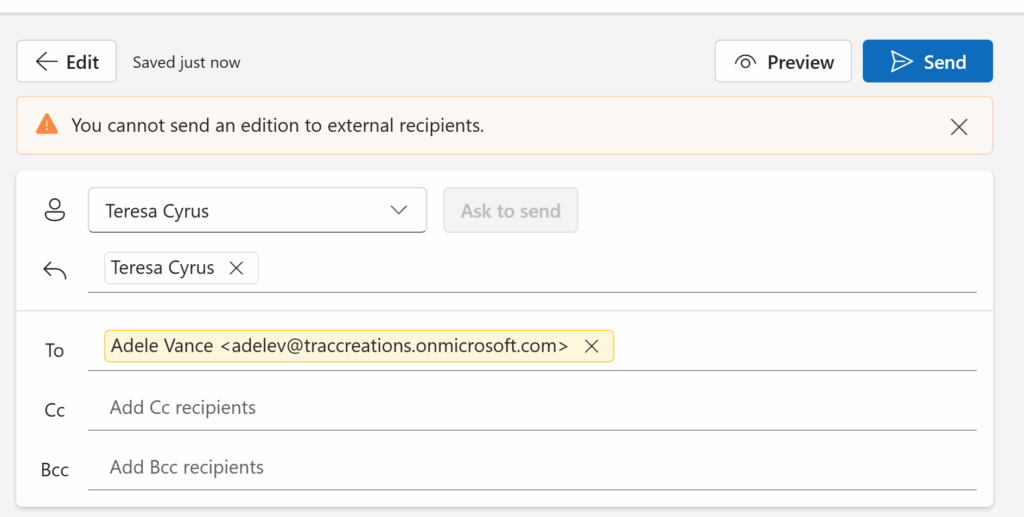
Ugh.
Now, if you’re like me—a single-license Microsoft 365 user—you know how frustrating that is. I had already published my third edition, and by then…
I was over it.
The formatting struggles were draining my time and energy—I couldn’t even focus on writing the actual content! Tables were shifting, templates weren’t reusable, and I had to save drafts to my local drive just to reopen and edit them. It was exhausting.
So when this new app arrived, I saw potential. But I also saw a wall.
Good news? There’s a workaround.
Workaround for Sending an Outlook Newsletters Externally
To share your Outlook Newsletter externally, follow these quick steps to forward and clean it up before sending.
- Step 1: Go to Your Sent Folder
Once your newsletter has been published, you’ll find a copy in your Sent Items folder.
- Press the Forward button. This will open a new email message.
- Watch this tutorial video for How to Use Outlook Newsletter.
Step 2: Clean Up the Sent Email Version
Before sending the newsletter:
- Remove “FW:” from the subject line.
- Adjust subject line or preview text for external readers
- Verify “TOC” links —yes, they still work!
- Delete internal-only rows, such as:
- Subscribe to [newsletter group]
- Add Comment / Reactions icons
- “Get Started” links pointing to internal portals
- Note: External users will receive an access denied message.
Step 3: Use Mail Merge (Recommended)
If you’re sending to a list of external contacts:
- Mail Merge allows you to input individual email addresses without exposing them.
- Mail Merge hides email addresses while sending individually.
- Works better than CC/BCC, which exposes all recipients.
- For bulk lists, watch this video tutorial on Outlook Mail Merge.
Step 4: Send the Newsletter
- Once cleaned, send the email directly.
- Recipients will see a professional newsletter — without broken links or internal-only prompts.
Extra Tips Before Publishing for Outlook Newsletters
- Resize banners to 704 x 396 px for consistent rendering.
- Avoid changing column widths (may break layout across devices).
- Save a cleaned draft as a template for future editions.
Why This Workaround Matters
For many of us — solopreneurs, consultants, small teams — the Outlook Newsletter feature is powerful but limited. This workaround makes it possible to:
- Share newsletters externally with clients and partners.
- Maintain professional formatting.
- Skip Mail Merge setup from scratch every time.
- For an overview of the feature itself, read my post: Outlook Newsletter Feature Review | 2025 Update
Final Thoughts
FAQ: Sending Outlook Newsletters Externally
Q: Can I send an Outlook Newsletter outside my organization?
A: Not yet. The feature is limited to internal Microsoft 365 accounts. However, you can forward and clean the sent version to share it externally.
Q: How do I make Outlook Newsletters look professional externally?
A: Remove internal-only links, adjust the subject line and preview text, and resize banner images before sending. Using Mail Merge keeps recipient addresses private.
Q: Is Microsoft adding external support for Outlook Newsletters?
A: External support is on the Microsoft product backlog. Until then, forwarding with cleanup and Mail Merge is the best workaround.