Nice Idea or Messy Reality: Microsoft has introduced a way to view awards and certification badges on your profile card in Microsoft 365. When this is enabled by an organization, badges can appear in places where profile cards show up, including Outlook, New Outlook and the Copilot app. I suspect it will become available in Microsoft Teams.
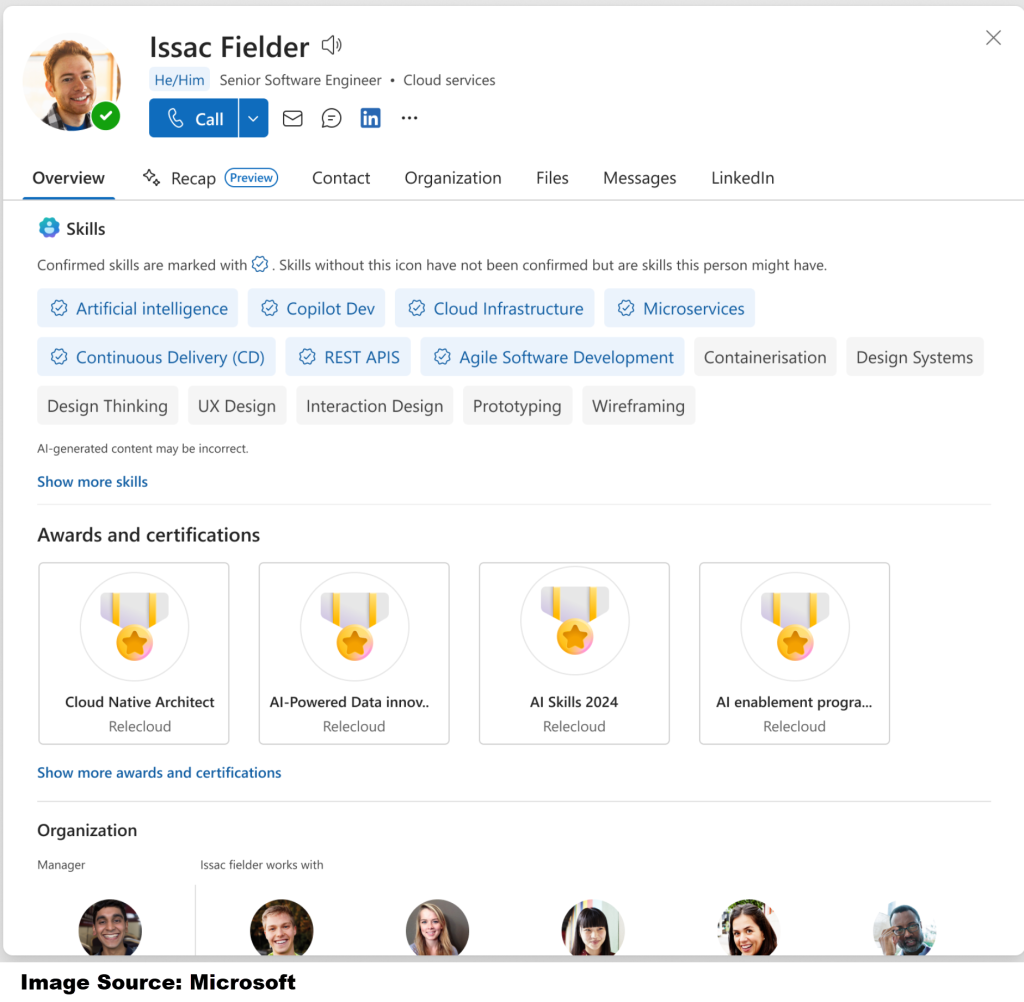
On the Overview tab, users can see up to four recent badges, and they can open the full card to view more on the Contacts tab. This badge information may be used by Microsoft 365 Copilot in people-related answers and profile summaries. (Microsoft Support).
That sounds great on paper.
In reality, I think this feature has a real chance of becoming more work than value for many organizations.
What profile card badges actually do
Let’s start with the facts.
This is a display feature, not a badge platform. See the Profile Card Badge screen below. Microsoft 365 shows the badge data on the profile card, but the badges themselves are issued and managed by the source system. If the organization does not configure a supported source or populate those properties, the section does not appear at all. This feature is read-only, shows title and issuer by default, and can reveal extra details like description and date awarded when selected. Recently earned badges can also be highlighted.
So no, this is not Microsoft magically solving credential management. It is Microsoft sharing credential data that somebody in your organization still has to govern, feed, validate, and maintain.
Why I am not fully sold on the Profile Card Skill Badge and Certifications
For internal recognition or training completion requirements, I can see the appeal. A company might want employees to quickly see that someone completed a required safety program, onboarding milestone, role-based certification, or internal academy path.
That part makes sense.
Where I start raising an eyebrow is when people act like this should become the grand central station for all professional credentials.
That is where this gets cumbersome.
There are already well-known credential ecosystems and badge platforms doing external credential sharing, such as Credly, Accredible, and Parchment/Canvas Badges. Microsoft’s own certification guidance also points people to their Certification Dashboard and using badges on LinkedIn or other career-focused social media.
That is why I think organizations need to slow down.
Just because profile card badges exist does not mean every external credential belongs there.
Who decides which credentials should display?
The governance problem is the real story.
Here is the part people are not talking about enough.That is not a small question.
A large organization can have:
- vendor certifications
- partner certifications
- internal training completions
- compliance badges
- role-based credentials
- academic or continuing education badges
One person alone could easily have badge records from multiple places. Think Microsoft credentials, a Credly-issued industry certification, an Accredible badge from a training provider, and a Canvas/Parchment badge from an academic program.
Now ask the hard questions:
- Do you show the newest badge or the most relevant one?
- Do you show mandatory credentials only?
- Do you allow external badges?
- Do you hide expired certifications?
- Do you keep everything forever?
- Who validates the badge if the employee changes roles?
- Who owns disputes when something is missing or wrong?
That is the real workload.
And because Microsoft says profile data from people sources can feed not only the profile card but also people search and Microsoft 365 Copilot, bad governance does not stay isolated. It becomes more visible across the tenant.
Microsoft’s people connector guidance also says this data is visible to all users in the organization and that connector items must grant access to everyone.
That should make any admin stop and think.
The admin side is not lightweight for Profile Card Badges
The support page is the easy part. It shows users how to view badges.
The plumbing behind it is where things get serious.
Microsoft’s admin documentation says profile card work involves organization-level people settings and admin roles such as Global Administrator or People Administrator. Microsoft’s connector guidance goes further: if you are bringing in people data from external systems, you may be dealing with Microsoft Graph external connections APIs, registering the connection as a profile data source, and setting prioritized source URLs so Microsoft 365 knows how to compose the profile.
That is not “turn it on and move on.”
That is identity, data source, connector, governance, and support work.
In addition, some profile card visibility changes can take up to 24 hours to appear, while people connector data can take up to about 6 hours to become available in search, people experiences, or Copilot.
How often should IT update the Profile Card Badge?
So now ask the practical question, what does the update process look like?
- Monthly?
- Quarterly?
- Only at recertification windows?
- Only for required roles?
Because if there is no operating model behind this feature, it will drift fast.
Possible Profile Card Badges Use Caess
My blunt take is this.
I think profile card badges are better for narrow internal use cases than broad credential showcase strategies.
Good use cases:
- internal training completion
- compliance visibility
- required job-role certifications
- approved company-issued credentials
- limited recognition programs with clear rules
Bad use cases:
- dumping every badge source into the tenant
- treating the profile card like a public portfolio
- exposing credentials without an owner, review cycle, or expiration policy
Why?
Because once everything is visible, nothing is useful.
And since Microsoft highlights recent badges on the card, the display can easily favor recency over relevance. The badge someone earned last week may show higher visibility than the credential that actually matters for their role.
That is not smart governance. That is visual clutter with a verification label.
And don’t forget about responsible governance must include fairness and unbiased to all.
Final thoughts
First, if you find this article helpful, please like it. It helps others with the same question. The link is at the top of the post.
Now, I like the concept.
I do not trust the execution unless an organization is disciplined.
If your company wants to use profile card badges, do the governance work first:
- define approved badge sources
- define which credentials qualify
- decide who owns the data
- decide the refresh cadence
- decide how expired or revoked credentials are handled
- pilot it with a limited group before rolling it out widely
Otherwise, this will not become a polished recognition system.
It will become another directory-data project that looks impressive in a demo and turns into cleanup work later.
For external recognition, public credential platforms and certification dashboards still make more sense. For internal profile cards, keep the scope tight, role-based, and governed. That is the only way this feature stays useful.
Now, go and work your magic.