If you’ve searched for Copilot vs Copilot Premium, you are not alone. The names can get confusing fast.
Microsoft Copilot is an AI assistant that can help you ask questions, create content, summarize information, research topics, and work through tasks using natural language. However, not every Copilot experience is the same.
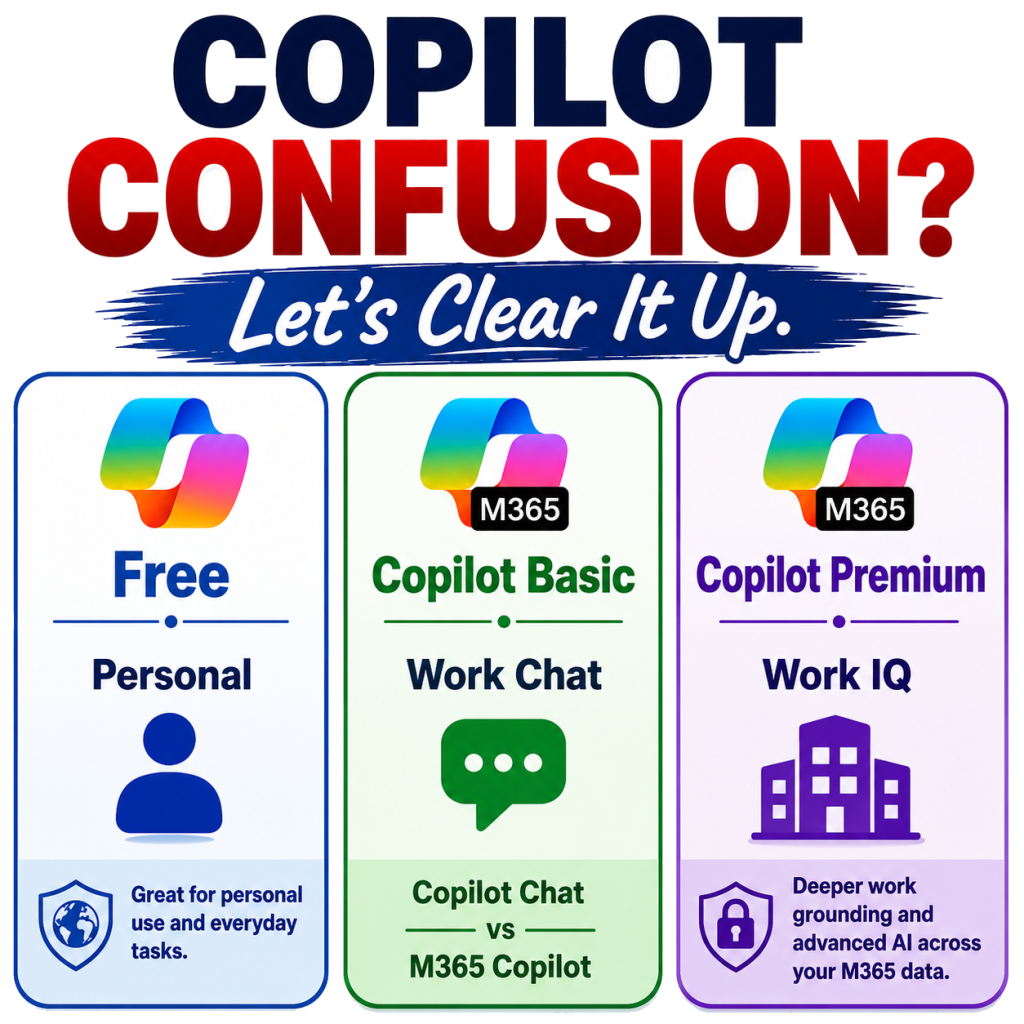
You may see labels for Copilot Free, Copilot Chat (Basic), M365 Copilot (Basic), and M365 Copilot (Premium). You also need to understand the access levels: Standard Access and Priority Access.
That is why this guide breaks down the differences clearly, so you know what each Copilot version can and cannot do.
Copilot Free — Your Everyday Personal Use Assistant
Copilot Free is the personal version of Microsoft Copilot. It is available on the web, in Microsoft Edge, on Windows and macOS, on mobile devices, or in the Copilot app. To sign in, use a personal email account such as Outlook.com.

One easy way to spot the personal Copilot app is the logo. It usually appears as Copilot without the Microsoft 365 label. This is especially helpful when downloading the app from the Microsoft Store, Apple App Store, or Google Play Store.
What You Can Do with Copilot Free
You can use Copilot Free to:
- Ask natural-language questions
- Get answers based on web information
- Rewrite text
- Summarize pasted content
- Brainstorm blog ideas, social posts, captions, or outlines
- Create images when image generation is available
- Use Copilot in Edge for webpage summaries and insights
- Compare or track shopping items when shopping features are available
This is a good starting point if you are new to AI.
Copilot Free App Features: Copilot Vision, Voice, Shopping, and Connectors
The Copilot app has features to help you accomplish your task.
- Copilot Vision: Share your screen or a part of it so Copilot can “see” what is on-screen and help explain UI elements, navigation steps, or other visual content.
- Copilot Voice: Instead of typing every prompt, you can have a conversational back-and-forth. Ask follow-up questions, clarify your request, or adjust the tone just like chatting with a teammate.
- Shopping: Compare products, review options, and track prices when shopping features are available.
- Connectors: Connect supported services, such as email, calendar, or storage accounts, depending on your Copilot experience and account settings. The app settings display the supported services.
However, do not confuse Copilot Free with Microsoft 365 Copilot for work. Copilot Free draws from web data and gives you broad internet context. It does not automatically connect to your work files, emails, meetings, or organizational data unless you intentionally upload, paste, or connect that content.
Copilot Basic — Your Workday AI Assistant

Copilot Chat is the secure AI chat experience for work and school users who sign in with an eligible Microsoft 365, Office 365, or Teams-related account.
Depending on your organization’s licensing and configuration, you may see one of these labels near your profile picture or inside the Microsoft 365 Copilot experience:
Copilot Chat (Basic)
You can use secure Copilot Chat for work, including supported Outlook email experiences. However, you do not have the paid M365 Copilot license or Copilot Chat access directly inside Word, Excel, PowerPoint, or OneNote. That means you will not see the Copilot logo inside those apps.

Tip: You can still go to the Copilot Chat home page and enter a prompt to create a draft document, spreadsheet, or presentation content about a topic. Then, copy the content or open the generated file in the appropriate Microsoft 365 app.
M365 Copilot (Basic)
You do not have the paid Microsoft 365 Copilot add-on license. Copilot Chat is available while Outlook is open.

However, you may have Standard Access* to Copilot Chat inside Microsoft 365 apps such as Word, Excel, PowerPoint, and OneNote.
M365 Copilot (Premium)
You have the paid Microsoft 365 Copilot add-on license and access to the fuller Copilot experience.

Premium users also get Priority Access, which provides more consistent access than Standard Access users when using Copilot capabilities inside supported Microsoft 365 apps, including Word, Excel, PowerPoint, and OneNote.
Does Organization Size Affect Copilot Chat Basic Access?
In March 2026, Microsoft shared Message Center posts that referenced organization size and Copilot access in Word, Excel, PowerPoint, and OneNote for users without the paid Microsoft 365 Copilot license.
As of June 2026, Microsoft has removed the original Message Center posts, MC1253858 and MC1253863. I also do not see this detail in Microsoft’s current documentation. Because of that, I do not want to present the 2,000-user detail as current Microsoft guidance.
For now, I suggest checking the Copilot label mentioned above. And if this article has been helpful so far, remember to press the Like button at the top of this post.
Copilot Chat (Basic) vs M365 Copilot (Basic)
Copilot Chat (Basic) and M365 Copilot (Basic) are very similar. Both versions mean:
- Eligible work or school account
- No paid Microsoft 365 Copilot add-on license
- Secure AI chat for work
- Standard Access*
- Web-grounded prompts
- File upload, when available
- Drafting, rewriting, and summarizing
- General work questions
- Outlook and Teams help, when available
The main thing to understand is this: Copilot Chat and M365 Copilot are web-grounded by default. That means the use web information, plus the details you provide in the prompt, to help answer questions, explain topics, draft content, summarize pasted text, compare ideas, and research general information.
These versions do not automatically know your work content. They do not automatically search across everything you can access in Microsoft 365, such as:
SharePoint files | OneDrive files | Teams chats | Meetings | Emails | Calendar history | Organizational relationships
You can still upload a file, paste text, or ask about available Outlook or Teams context when supported. But that is not the same as full work grounding like the paid add-on license.
Copilot Premium is different.
With the paid Microsoft 365 Copilot license, Copilot can use work grounding, also known as Work IQ. That means it can use more of your Microsoft 365 work context, based on your permissions, to provide deeper answers across your apps, data, and web.
That is the core difference:
- Basic = web-grounded, plus what you upload
- Premium = web- and work-grounded, using more of your Microsoft 365 context
Standard Access vs Priority Access
Standard Access and Priority Access are not separate Copilot products. They are access levels.
Standard Access
Standard Access applies to users who do not have the paid Microsoft 365 Copilot add-on license. This includes users with Copilot Chat (Basic) and M365 Copilot (Basic).
With Standard Access, Copilot capabilities are subject to service capacity and may vary throughout the day.
During busy periods, users may notice:
- Slower responses
- Limited features
- Temporary restrictions
- Different model behavior
- Reduced access to features such as file upload, image generation, advanced reasoning, or voice
That does not always mean Copilot is broken. It may simply mean the user is on Standard Access.
For M365 Copilot (Basic), Standard Access may also allow Copilot directly inside Microsoft 365 apps such as Word, Excel, PowerPoint, and OneNote. Work data reasoning is limited compared to Copilot Premium.
Priority Access
Priority Access applies to users with the paid Microsoft 365 Copilot add-on license. These users see the M365 Copilot (Premium) label.
Priority Access provides more consistent access to Copilot capabilities, especially during peak usage periods. It also supports the fuller Microsoft 365 Copilot experience with deeper work grounding across meetings, emails, chats, files, and more.
Copilot Basic and App Experiences
This is where the feature differences begin to show between Microsoft 365 Copilot vs Copilot Premium:
- Chat History & Memory: Copilot Chat can maintain context across select Microsoft 365 apps when the feature is available. This helps users “pick up where they left off.” For example, if you are working on a document in Word, switch to Outlook, and then return to the chat, Copilot may remember the thread instead of forcing you to start over. It is a small change, but it can make a big difference for workflow continuity.
- Agents: Users without the paid Microsoft 365 Copilot license may have limited agent access. Currently, Prompt and Idea Coach are available to Copilot Chat (Basic) and M365 Copilot (Basic), depending on your tenant settings and rollout status. These users can also create custom web-grounded agents and upload files when prompting.
- Notebook: Microsoft recently added Notebook functionality for some Copilot Basic users. Notebook works with selected content to help organize information, generate summaries, create mind maps, build flashcards, and create quizzes when available.
Watch the video to see Copilot Chat and Copilot Premium side by side.
In the video, I demonstrate web grounding and work grounding so you can see why the experience feels different.
The screens may look different now, but the concept still applies.
Microsoft 365 Copilot Premium — Your Strategic AI Partner
If Copilot Free is your everyday helper and Microsoft 365 Copilot is your workday assistant, then Copilot Premium is your strategic partner.
With a paid Copilot license, this version unlocks the fuller Microsoft 365 Copilot experience by connecting Copilot more deeply with your Microsoft 365 work data, including:
- Emails
- Meetings
- Teams chats
- Files
- Calendar information
- Other content you have permission to access
Pricing can vary by plan, organization type, region, agreement, promotion, and billing terms. Always check Microsoft’s current pricing page or your Microsoft admin center for the latest amount.
What You Get with Copilot Premium
Copilot Premium includes the basic chat experience, plus deeper work grounding and stronger Microsoft 365 app integration.
With Premium, users may get:
- Priority Access to Copilot capabilities
- Work-grounded responses across Microsoft 365 data they have permission to access
- Copilot inside supports Microsoft 365 apps
- Stronger drafting, rewriting, summarizing, and editing
- Better meeting summaries and action items
- Deeper Outlook, Teams, Word, Excel, and PowerPoint workflows
- Broader access to agents and advanced capabilities when available
- More Outlook help for prioritizing email and preparing for calendar decisions
- Scheduled prompts and recurring task support when available
- Expanded Notebook capabilities for insights, mind maps, study guides, and office documents
The value is that Copilot can use more context from your work to help you take action.
Because Copilot features, agents, and app experiences continue to change, always check your own Copilot screen, Microsoft 365 admin settings, and Microsoft’s current roadmap for the latest availability.
App-by-App Breakdown: Copilot Basic vs Copilot Premium
Now that you know the differences by tier, here’s how the experience varies inside your favorite Microsoft 365 apps.
| App | Copilot Chat (Basic) | M365 Copilot (Basic) | M365 Copilot (Premium) |
|---|---|---|---|
| Outlook | May help with secure chat, summaries, drafts, inbox questions, calendar questions, and email context while Outlook is open. | May help with secure chat, summaries, drafts, inbox questions, calendar questions, and email context while Outlook is open. | Uses deeper mailbox, calendar, meeting, file, and organizational context when permissions allow. |
| Word | No Copilot Chat access inside Word. Users can still ask questions about an uploaded Word file, use web content, or generate draft document content from the Copilot Chat home page. | Standard Access to Copilot Chat inside Word. Users may ask questions about open documents, summarize content, draft text, or rewrite selected content. From the Copilot Chat home page, users need to attach or upload a source file. | Deeper drafting, rewriting, summarizing, editing, and file-based reasoning. |
| Excel | No Copilot Chat access inside Excel. Users can still ask questions about an uploaded Excel file, use web content, or generate spreadsheet content from the Copilot Chat home page. | Standard Access to Copilot Chat inside Excel. Users may ask questions about open workbooks or perform selected analysis. From the Copilot Chat home page, users need to attach or upload a source file. | Stronger workbook understanding, formulas, charts, analysis, forecasting, and Python-supported analysis when available. |
| PowerPoint | No Copilot Chat access inside PowerPoint. Users can still ask questions about an uploaded PowerPoint file, use web content, or generate presentation content from the Copilot Chat home page. | Standard Access to Copilot Chat inside PowerPoint. Users may ask questions about open presentations or create selected slide content. From the Copilot Chat home page, users need to attach or upload a source file. | Stronger presentation creation, slide refinement, design help, story flow, and file-grounded content. |
| Teams | May support secure chat and selected prompts when enabled in Teams. Meeting and transcript access may be limited without the paid license. | Similar Teams access, depending on tenant settings and rollout status. |
Stronger meeting summaries, recap, action items, chat context, follow-ups, and work-grounded collaboration support. |
| OneNote | No Copilot Chat access inside OneNote. |
Standard Access to Copilot Chat in OneNote. Users may summarize or organize selected notes. |
Stronger note summarization, organization, action-item extraction, and work-grounded help where supported. |
Note: In some cases, New Outlook may receive Copilot features sooner than Outlook Classic. Check the Microsoft 365 Roadmap for rollout timing.
Copilot vs Copilot Premium: Quick Comparison
| Feature | Copilot Free | Copilot Chat (Basic) | M365 Copilot (Basic) | M365 Copilot (Premium) |
|---|---|---|---|---|
| Best for | Personal AI help and public web tasks | Secure work chat | Secure work chat plus app access | Full Microsoft 365 Copilot work experience |
| Account type | Personal Microsoft account | Work or school account | Work or school account | Work or school account |
| Add-on Copilot license required | No | No | No | Yes |
| Access level | Varies | Standard Access | Standard Access | Priority Access |
| Web grounding | Yes | Yes | Yes | Yes |
| Full work grounding | No | No | No | Yes |
| Main entry points | Copilot web, Edge, Windows, mobile app | Microsoft 365 Copilot Chat home page, Outlook, Teams, and Edge | Copilot Chat home page, Outlook, Teams, Edge, Word, Excel, PowerPoint, and OneNote | Microsoft 365 Copilot app, Outlook, Teams, Word, Excel, PowerPoint, OneNote, and other supported apps |
| Word, Excel, PowerPoint, OneNote | Not for work app access | Not included | Included with Standard Access | Included with Priority Access |
| Outlook | Personal or web use | Available when Outlook context is available | Available when Outlook context is available | Available with deeper work context |
| Teams | Personal or web use | Available where enabled | Available where enabled | Available with deeper meeting, chat, and work context |
| File upload | Available with limits | Available with Standard Access limits | Available with Standard Access limits | Available with Priority Access |
| Agents | Limited or personal features | Limited agent access | Limited agent access | Broader agent access, including advanced agents when available |
| Security | Personal Microsoft terms | Enterprise data protection | Enterprise data protection | Enterprise data protection |
| Simple explanation | Personal Copilot | Secure work chat only | Secure work chat plus app access | Full paid Microsoft 365 Copilot |
Final Thought
The main question is not just, “Do I have Copilot?”
The better question is, “Which Copilot experience do I have, and what can it access?”
Copilot Free is great for personal tasks and web-based help. Copilot Basic gives work and school users secure AI chat with Standard Access. Copilot Premium gives users the fuller Microsoft 365 Copilot experience with deeper work grounding and Priority Access.
Start with the version you already have. Learn what it can do well. Then decide if Premium is worth it based on the work you need Copilot to perform.
Stay connected. I’ll be sharing more updates and videos soon.
Now go ahead, “Explore, Experiment, and Execute Effectively” with Copilot by your side.