Before you create a Copilot Notebook, use this four-question test to decide whether the workspace will add real value.
A Copilot Notebook can focus Copilot on selected sources, preserve context across repeated work, and help turn information into useful content. However, not every project needs another workspace to name, organize, share, update, and maintain.
If your first question is how Copilot Notebook differs from OneNote, review Copilot Notebook vs OneNote. That companion article explains when each tool is a better fit.
This article addresses the next decision: Is your project strong enough to justify creating a Copilot Notebook?
Before You Create a Copilot Notebook, Understand What It Adds
A Copilot Notebook is a focused, AI-powered workspace grounded in references you deliberately select.
Those references can include files, emails, meeting information, chats, OneNote pages, Copilot Pages, links, and other supported content. Together, they create a defined source boundary for Copilot.
Several Notebook components help people work with that collection:
- References provide the selected source material.
- Overview helps users understand the collection and its main themes.
- Notebook Chat answers questions grounded in those references.
- Created Content separates new outputs from the original source material.
- Mind maps and Study Guides can organize information into visual or structured experiences.
The value is not simply having these features. The value comes from using them together for an ongoing purpose.
A temporary Copilot Chat conversation may answer one question. In contrast, a Copilot Notebook keeps the selected sources, context, and related work together.
Copilot Notebook Licensing and Availability
Copilot Notebook licensing and availability are still changing.
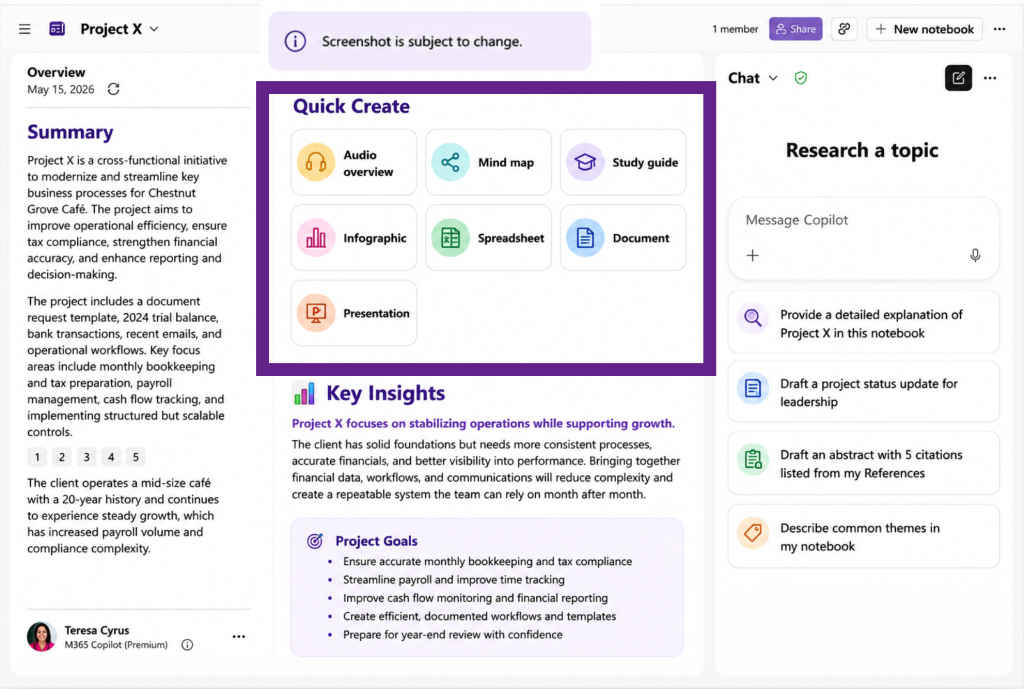
As of August 3, 2026, the following creation capabilities are available with a Microsoft 365 Copilot Premium license:
- Audio overviews
- Infographics
- Presentations
- Documents
- Spreadsheets
Other Notebook experiences, including References, Overview, Notebook Chat, Mind maps, and Study Guides, are also available to Copilot Basic users depending on the platform and rollout status.
Copilot Notebook can also currently be accessed through OneNote. However, Microsoft is still developing the experience. Entry points, feature availability, and licensing requirements may change.
Therefore, confirm the available features in your account before promising a specific Notebook experience to employees, learners, or clients.
1. Does the Project Require Deliberately Selected Sources?
A useful Copilot Notebook starts with a clear source boundary.
You should not add every document you can find. Instead, select the files, conversations, notes, emails, and other references that support one project, audience, decision, or outcome.
The current Notebook reference limits are:
- Microsoft 365 Copilot Premium: Up to 300 references
- Copilot Basic: Up to 50 references
These limits were confirmed during the most recent Content Program meeting. However, reaching the maximum should not be the goal. A smaller, relevant collection is more useful than hundreds of loosely connected references.
For example, an HR open-enrollment Notebook might include:
- Current benefits guides
- Approved policy documents
- Frequently asked employee questions
- Campaign planning notes
- Benefits-provider presentations
- HR project meeting notes
- Approved deadlines and contact information
Each source has a reason to be there.
As a result, Copilot can focus on the approved collection instead of allowing unrelated information to dominate the response.
Can I clearly explain why every source belongs in this Notebook?
A random collection of available files is not a strong Notebook. The owner should be able to explain both what belongs in the collection and what should remain outside it.
The reference limit tells you how many sources you can add. It does not tell you whether those sources belong together.
When Another Tool Is Better, such as Copilot Chat with Work IQ, SharePoint or OneNote, is explained in Copilot Notebook vs OneNote: Which Workspace Should You Use.
2. Will People Reuse the Same Source Collection?
A Copilot Notebook becomes more valuable when people return to the same linked references for several questions, meetings, decisions, or deliverables.
For example, a project team might reuse a Notebook to:
- Prepare weekly status updates
- Compare new information with earlier decisions
- Answer recurring stakeholder questions
- Identify risks and unresolved issues
- Draft meeting agendas
- Develop reports and presentations
- Prepare training or communication materials
- Add new references as the project changes
The benefit is continuity.
Users do not have to locate the same materials or rebuild the context for every conversation. The Overview, references, grounded conversations, and created content remain connected to the same purpose.
As a bonus, when a linked file is updated, Copilot Notebook is immediately update.
Will the team return to this information after the first conversation?
When the task ends after one summary, comparison, or answer, creating a Notebook may add unnecessary maintenance.
For example, Copilot Chat may be enough when you need to:
- Summarize one document
- Compare a few files once
- Find one answer
- Draft one message
- Investigate a temporary question
A one-time task does not automatically need a reusable workspace.
3. Are You Preparing an Organized Experience for Other People?
A Copilot Notebook can become more than a collection of linked references. It can provide a prepared starting point for a team, department, employee group, learner, or participant.
Instead of asking every person to locate the correct documents and develop individual prompts, the Notebook creator can provide:
- A defined collection of approved sources
- An Overview of the main information
- Suggested starting questions
- Custom instructions
- Supporting summaries and explanations
- Created content
- A mind map or Study Guide
For example, an HR team could build an employee benefits Notebook from approved policies, plan information, frequently asked questions, and campaign materials.
A Study Guide could then help employees:
- Review the Summary for an overview of the benefit options
- Explore Topic Pages for details about eligibility, enrollment, and plan changes
- Use Flashcards to review important terms, deadlines, and benefit-plan language
- Complete a Quiz to check their understanding before making enrollment decisions
- Practice with Matching activities to connect benefit terms with the correct definitions or plan options
- Complete Fill in the Blanks to reinforce important dates, requirements, contacts, or policy details
- Return to source citations when they need to verify information
Study Guides are not limited to formal education.
For example, a presenter could use Flashcards to prepare for a speaking engagement by reviewing major points, supporting facts, key terminology, audience questions, and transitions between topics.
Study Guides and their components can also support onboarding, policy awareness, product knowledge, project preparation, employee campaigns, and other workplace scenarios.
However, a Study Guide is not automatically a learning-management system. It does not prove compliance, issue certifications, or provide formal completion tracking unless another system handles those requirements.
Are we preparing a useful experience, or merely giving people another folder of documents?
A prepared Notebook should reduce the effort required to find, understand, and use the information.
Before sharing a linked reference, also review the permissions for every reference. A Notebook does not remove the access restrictions applied to its original source material.
4. Will the Notebook Produce a Distinct and Reusable Outcome?
A Copilot Notebook should lead to a defined result.
That result might include:
- A project briefing
- A launch plan
- A training resource
- An employee campaign
- A decision report
- A reusable knowledge experience
- A stakeholder presentation
- A set of communication materials
Notebook Chat can help identify patterns, compare information, surface gaps, summarize findings, and recommend next steps.
The benefit is transformation. The Notebook does not merely hold the references. It helps people understand, connect, question, and apply them.
What will this Notebook help us produce more conveniently than a temporary Copilot Chat conversation?
“It will help us be more productive” is not a sufficient answer.
Name the intended output by providing instructions that define the audience and business purpose before building the Notebook.
For example, instead of asking Copilot to “create a presentation,” provide direction such as:
Create a presentation for department managers that explains the upcoming benefits-enrollment changes. Focus on the decisions managers must communicate to employees and the actions they must complete before the enrollment deadline.
This instruction identifies:
- The intended output
- The audience
- The subject
- The business purpose
- The action the audience should take
A clearer destination makes it easier to determine which sources belong in the Notebook and which created content will be useful.
The Four-Part Copilot Notebook Decision Test
Before creating a Notebook, answer these four questions:
1. Selected Sources: What specific references must be brought together, and why does each one belong?
2. Repeated Use: How will people reuse the collection for ongoing questions, meetings, decisions, or deliverables?
3. Prepared Experience: What organized experience will the Notebook provide to a team, employee group, learner, or participant?
4. Distinct Outcome: What will the Notebook help create more conveniently than Copilot Chat, SharePoint, OneNote, or another existing workflow?
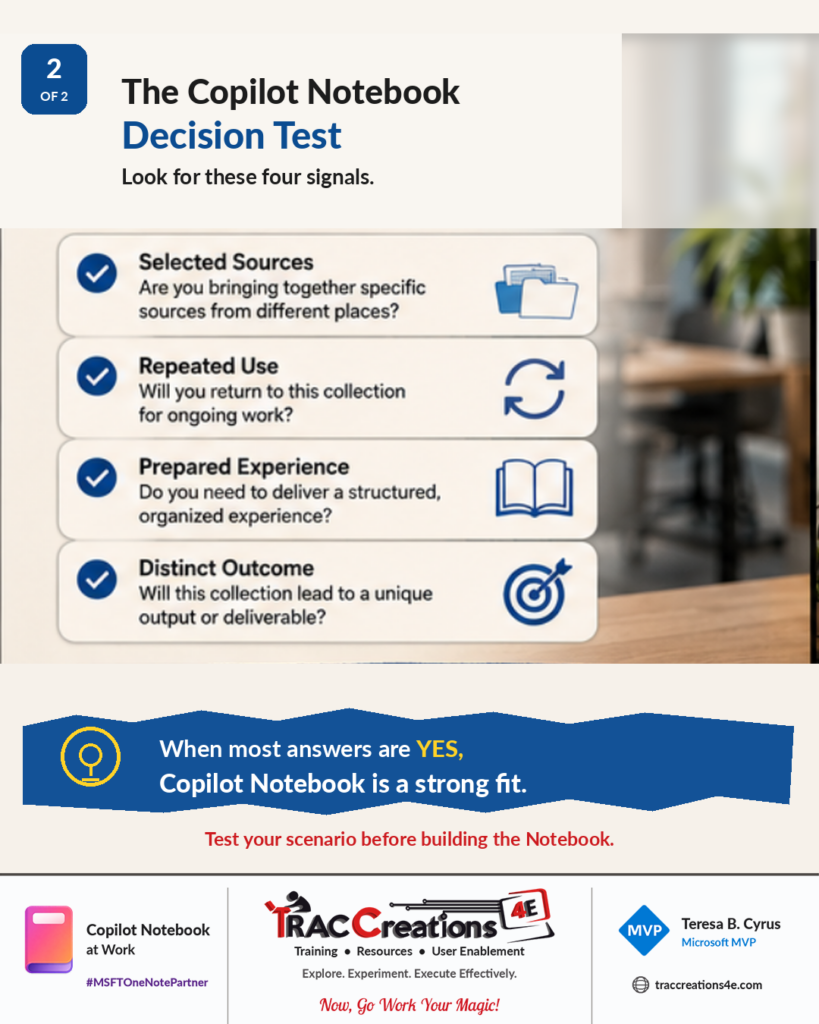
When most answers are no, do not force the scenario into Copilot Notebook.
Use an existing Microsoft 365 Copilot experience that already handles the task effectively.
When most answers are yes, Copilot Notebook is a strong fit.
The goal is not to create more Notebooks. The goal is to create fewer, better Notebooks with a defined purpose.
Continue Exploring Copilot Notebook
Copilot Notebook is still evolving. Features, entry points, supported platforms, reference limits, and licensing requirements may change as Microsoft continues developing the experience.
Review my Copilot category for additional blog posts about Copilot and Copilot Notebook.
Now, go work your magic.
Copilot Notebook at Work | From Sources to Solutions | #MSFTOneNotePartner