Cross-Tenant Message Recall gives organizations a new way to recall an email sent to someone in another Microsoft 365 organization.
Have you ever clicked Send and immediately realized that the message contained the wrong attachment or incorrect information? Message Recall has worked for messages sent within the same organization in many situations, but it has not generally worked for messages sent to external recipients.
That limitation is changing, but organizations must plan before enabling the feature.
What Is Cross-Tenant Message Recall?
A Microsoft 365 tenant is an organization’s Microsoft 365 environment, including its users, mailboxes, domains, and settings.
Until now, Message Recall has generally worked only when the sender and recipient were in the same organization. Cross-Tenant Message Recall extends that capability to approved external Microsoft 365 organizations.
For example, if someone at Company A recalls a message sent to Company B, Company B must have the feature enabled and Company A’s Microsoft Entra tenant ID on its approved sender list. Otherwise, Exchange Online will reject the recall.
The recipient does not approve the request. Company B’s administrators control which external organizations can recall messages from its users’ mailboxes.
When Is Cross-Tenant Message Recall Rolling Out?
Microsoft announced the feature in July 2026, with rollout scheduled to begin in mid-August 2026 and continue through mid-September 2026. It will be available across Worldwide, GCC, GCC High, DoD, and Microsoft 365 operated by 21Vianet environments. The feature is disabled by default.
This Is Not Universal External Email Recall
Cross-Tenant Message Recall does not mean users can recall every message sent outside their organization.
The feature is designed for approved organizations using supported Microsoft 365 and Exchange Online environments.
It will not provide recall support for messages sent to:
- Gmail accounts
- Yahoo accounts
- Consumer Outlook.com accounts
- Unsupported email systems
- Microsoft 365 organizations that have not approved the sender’s tenant
The term cross-tenant is important.
Microsoft is extending Message Recall between approved Microsoft 365 tenants. It is not creating a universal recall option that works across every email service.
What Will Outlook Users Need to Do?
Users will continue to start Message Recall from Outlook the same way they do today. Cross-Tenant Message Recall does not add a new recall button or change the basic steps.
After the recall begins, Exchange Online attempts to remove the original message from the recipient’s mailbox. The sender receives a Message Recall Report showing the result for each recipient.
Recall results normally appear within a few minutes, although messages sent to many recipients may take longer. Exchange Online continues processing the recall request for up to 24 hours.
My December 2023 video shows how to recall a message in Outlook, and the steps remain the same. The difference happens behind the scenes, where Exchange Online checks whether the receiving organization has approved the sender’s tenant.
Previously, a recall sent to another organization would generally fail. With this feature, the recall may succeed when the two organizations have the required approval in place.
Starting a recall does not guarantee that every copy of the message or its contents will disappear. The recipient may have already read, forwarded, downloaded, copied, or saved the message.
What Microsoft 365 Administrators Must Do
Cross-Tenant Message Recall will not turn on automatically.
Microsoft 365 administrators must:
- Enable the feature in their tenant.
- Add the Microsoft Entra tenant IDs of approved organizations.
- Decide whether each relationship should support one-way or two-way recall.
- Review their existing Message Recall settings.
- Test the configuration before announcing it to users.
- Update internal help-desk and user documentation.
The configuration is completed through Exchange Online PowerShell.
I am not including the PowerShell commands in this article because administrators should follow Microsoft’s current technical instructions before changing their Exchange Online configuration.
Administrators can review the latest requirements in Microsoft’s official Cross-Tenant Message Recall in Exchange Online announcement.
How Should Organizations Choose Trusted Tenants?
Administrators should not approve every organization that communicates with their users.
Adding another tenant to the approved list creates a controlled interaction between two separately managed Microsoft 365 environments. Each approval should have a clear business reason, an owner, and a review process.
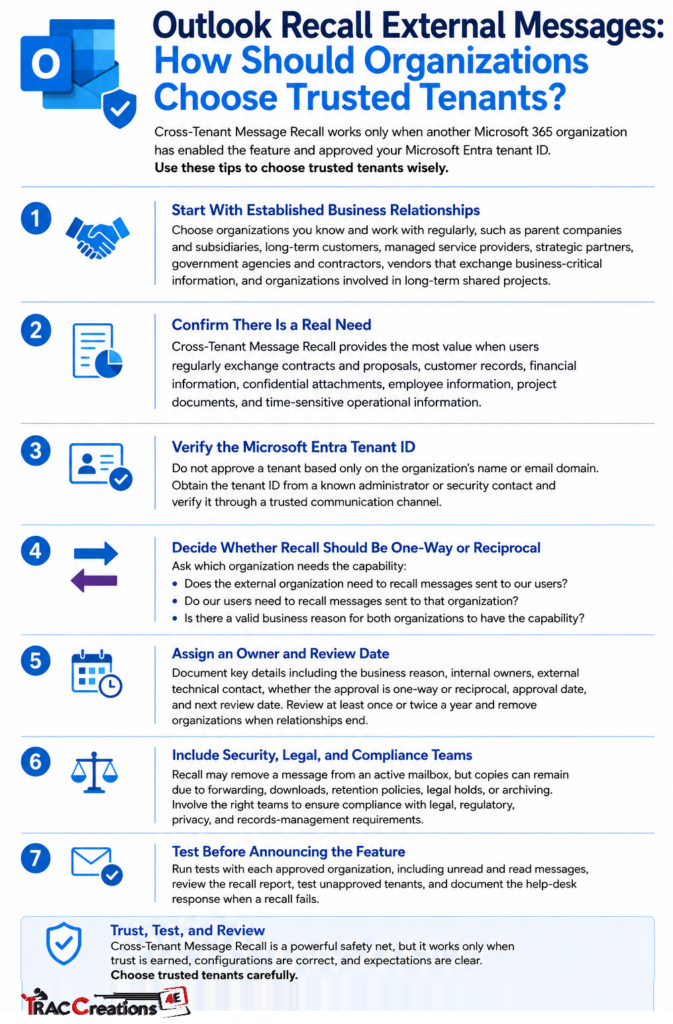
Begin with organizations your company knows and works with regularly.
Possible candidates include:
- Parent companies and subsidiaries
- Long-term customers
- Managed service providers
- Strategic partners
- Government agencies and contractors
- Vendors that exchange business-critical information
- Organizations involved in long-term shared projects
A company that sends occasional sales messages, newsletters, event invitations, or general inquiries probably does not need recall privileges.
Consider the type and frequency of information exchanged between the two organizations.
Cross-Tenant Message Recall may provide the most value when users regularly exchange:
- Contracts and proposals
- Customer records
- Financial information
- Confidential attachments
- Employee information
- Project documents
- Time-sensitive operational information
The organization should be able to explain why the benefit of recall justifies adding the external tenant to its approved list.
Do not approve a tenant based only on an organization’s name or email domain.
A company may own several email domains. It may also operate more than one Microsoft 365 tenant.
Obtain the Microsoft Entra tenant ID from a known administrator or security contact at the partner organization. Verify it through an established communication method instead of relying on an unexpected email request.
The tenant ID must match the Microsoft 365 organization being approved.
Approval is one-way. Both organizations must separately approve each other to support recall in both directions.
Ask:
- Does the external organization need to recall messages sent to our users?
- Do our users need to recall messages sent to that organization?
- Is there a valid business reason for both organizations to have this capability?
Each direction requires a separate decision and configuration.
Every approved tenant should have an internal business owner.
Document:
- The external organization’s name
- The verified Microsoft Entra tenant ID
- The business reason for approval
- The internal business owner
- The internal technical owner
- The external technical contact
- Whether the approval is one-way or reciprocal
- The approval date
- The next review date
Review the approved list once or twice a year. Remove organizations when contracts, partnerships, or shared projects end.
Without an owner and review date, old approvals may remain active longer than necessary.
Recall may remove a message from an active mailbox, but it does not guarantee that every copy or record disappears.
Forwarded messages, downloaded attachments, retention policies, legal holds, and eDiscovery may preserve the message or its contents.
Organizations with legal, privacy, regulatory, or records-management requirements should review these limitations before approving external tenants.
Complete controlled tests with each approved organization before telling users they can rely on Cross-Tenant Message Recall.
Testing should include:
- Recalling an unread test message
- Testing a message that has already been read, based on the organization’s recall settings
- Confirming that the sender receives the Message Recall Report
- Reviewing what the recipient sees
- Testing a recall from an organization that is not approved
- Documenting the help-desk response when a recall fails
Testing will be especially important during the initial rollout because two organizations may receive the feature at different times.
Message Recall Is Still a Final Safety Net
Cross-Tenant Message Recall gives organizations another way to respond after an email mistake.
It does not guarantee that confidential information has been completely removed.
A recipient may have already:
- Read the message
- Taken a screenshot
- Downloaded the attachment
- Saved the message elsewhere
- Forwarded the message
- Copied information from the message
- Triggered another system that processed or archived the content
For that reason, Message Recall should remain the final safety net, not the first line of protection.
Organizations should continue using:
- External-recipient warnings
- Sensitivity labels
- Email encryption
- Data Loss Prevention policies
- Delayed sending
- Attachment-review procedures
- User training
- Incident-reporting processes
If sensitive information is sent to the wrong recipient, users should follow their organization’s reporting process immediately instead of waiting for the Message Recall Report.
Final Thoughts
Cross-Tenant Message Recall can help organizations correct certain external email mistakes, but it requires planning before it is enabled.
Administrators should carefully choose trusted tenants, verify tenant IDs, test the feature, and explain its limitations to users.
The feature is useful, but it should remain a final safety net, not a replacement for good email security and reporting practices.